If you are choosing between SendCertificates and SimpleCert, the short answer is this: both send personalised certificates in bulk and both offer a free plan, so the decision comes down to how your recipient data arrives and whether you need QR verification. SendCertificates is built around uploading a spreadsheet and sending to everyone at once with a scannable QR code on each certificate. SimpleCert leans on app and form integrations.
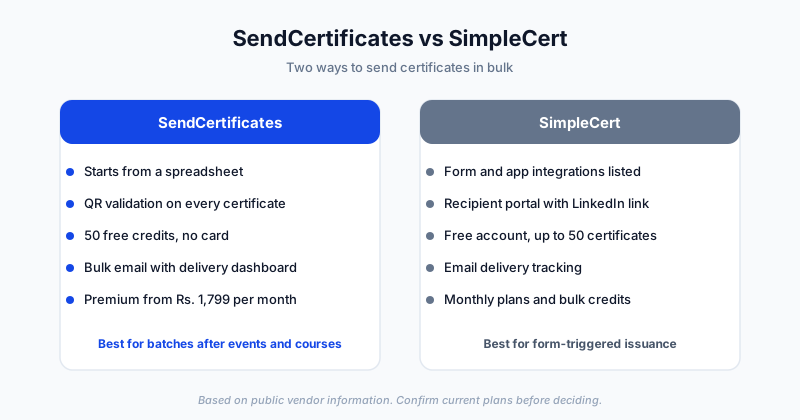
This comparison is based on SimpleCert's public website and on SendCertificates' own plans. Where we could not confirm something about SimpleCert, we say so instead of guessing.
Platform Overview
SendCertificates is a digital certificate platform for people who need to issue many certificates at once. You pick or design a template, upload a spreadsheet of recipients, map the fields such as name, course, and date, and send. Each certificate carries QR code validation, and a dashboard shows delivery.
SimpleCert is a certificate management platform. Its site describes building custom certificates, uploading recipient data or connecting integrations to import it, emailing recipients a link to download, and tracking email delivery. It also describes a recipient portal where people can access their certificates and link them to LinkedIn.
Feature Comparison
| Feature | SendCertificates | SimpleCert |
|---|---|---|
| Free plan | 50 certificate credits, no card | Free account, up to 50 certificates |
| Bulk sending from a spreadsheet | Core workflow (CSV or Excel) | Upload recipient data supported |
| Template editor | Drag-and-drop editor, templates included | Custom designs and ready templates |
| QR code validation | On every certificate, including free | Not described on the homepage we reviewed |
| Email delivery | Yes | Yes, with customisable email templates |
| Delivery tracking | Analytics dashboard | Email delivery tracking |
| App and form integrations | Spreadsheet-first | Lists Zapier, Google Forms, JotForm, Mailchimp and others |
| Recipient portal | Not a focus | Yes, with LinkedIn linking |
| Paid pricing | Premium ₹1,799 per month with 1,000 credits | Monthly plans and bulk credits, amounts not shown on the homepage |
If a row matters to your decision, confirm it on each vendor's current pricing and documentation page before you commit. Plans change.
Where SendCertificates Is the Better Fit
You start from a spreadsheet. Event registrations, attendance sheets, LMS exports, and internship lists all end up as a CSV. SendCertificates is designed for that: upload, map fields, preview, send. There is no integration to configure first.
You want QR validation by default. Every certificate carries a scannable code that leads to a verification page. That helps when an employer or institution wants to check a certificate they received as a PDF or a printout. For how this works in detail, read our guide to QR-verified certificates.
You want to test with a real batch for free. Fifty credits is enough to run a workshop-sized cohort end to end before paying anything.
Where SimpleCert May Be the Better Fit
You want certificates triggered by a form or app. If your certificate should be issued automatically when someone submits a Google Form or a JotForm entry, SimpleCert's listed integrations are built for that. A spreadsheet-first tool needs you to export the data first.
You like a recipient portal. If you want recipients to log in, see their certificates in one place, and link them to LinkedIn, that is a stated feature of SimpleCert.
Being honest about this matters: the right tool is the one that matches how your data arrives, not the one with the longest feature list.
Which Should You Choose?
Choose SendCertificates if:
- Your recipients live in a spreadsheet
- You issue certificates in batches after events, courses, or internships
- QR code validation on every certificate matters to you
- You want to try a full batch on the free plan first
Choose SimpleCert if:
- You want issuance triggered automatically from forms or apps
- A recipient portal is important to your program
How to Decide in 20 Minutes
- Take a real recipient list of 20 to 50 people.
- Create an account on both tools and build the same certificate.
- Send to yourself and a colleague.
- Compare how long setup took, how the email looked, and whether you could verify the certificate.
Whichever result felt less like work is your answer. For a longer list of options, see our roundup of the best certificate management software in 2026.
Getting Started
If your next batch is an event, a workshop, or a course cohort, you can try the spreadsheet-to-inbox workflow free. SendCertificates includes 50 free credits, and you can create a free account without a credit card.
Related Guides
- SendCertificates vs Certifier: Which Certificate Platform Is Right for You?
- SendCertificates vs Accredible
- How to Send Certificates in Bulk
- Best Certificate Management Software in 2026
- SendCertificates vs Certify'em: Which Is Better for Academic and Course Certificates?
- SendCertificates vs Sertifier: An Honest Comparison (and a Sertifier Alternative)
Tags