If you are weighing SendCertificates against Sertifier, the short answer is this: choose Sertifier if you need Open Badges, LMS or CRM integrations, or an API. Choose SendCertificates if your recipients are in a spreadsheet and you want the quickest route from template to inbox, with a QR code on every certificate. Both let you design certificates and send them by email, and both have a free plan.
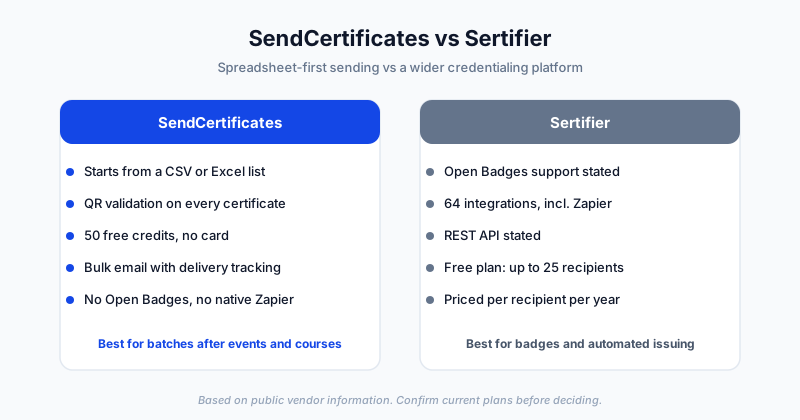
This comparison is based on Sertifier's public pages (the homepage, pricing, digital certificates and integrations pages) and on SendCertificates' own plans. We could not load a dedicated Sertifier features page, so where something is not described on the pages we reviewed, we say so instead of guessing. Plans change, so always confirm on each vendor's site.
Platform Overview
SendCertificates is built for people who issue many certificates at once. You choose or design a template, upload a CSV or Excel recipient list, map fields such as name, course and date, and send in bulk. Every certificate carries QR code validation, and a dashboard shows delivery.
Sertifier describes itself as a platform to "design, automate, and track certificates and badges". Its pages list a drag-and-drop editor, CSV upload or manual entry of recipients, email delivery, shareable links, PDF download, LinkedIn sharing, and automation from LMS, CRM or enrollment data through triggers and a REST API. Its audience is stated as L&D teams and higher education.
Feature Comparison
| Feature | SendCertificates | Sertifier |
|---|---|---|
| Free plan | 50 certificate credits, no card | Up to 25 recipients |
| Bulk sending from a spreadsheet | Core workflow (CSV or Excel) | CSV upload or manual entry stated |
| Template editor | Drag-and-drop, 2 templates on Free, 10 on Premium | Drag-and-drop editor, 100+ templates stated |
| QR code verification | On every certificate, including free | Stated, plus public verification pages |
| Open Badges | Not offered | Stated on the homepage |
| Integrations | Spreadsheet-first, no native Zapier | 64 listed, including Zapier, Google Sheets and Moodle |
| API | Not a focus | REST API stated |
| Delivery | Email, with delivery tracking | Email, links, PDF, LinkedIn sharing |
| Analytics | Basic on Free, advanced on Premium | Views, shares and verifications stated |
| Paid pricing | Premium Rs. 1,799 per month, 1,000 credits | Standard example: 750 dollars per year for 500 people |
Two details need care. Sertifier's homepage says credentials are verifiable by QR code and a blockchain-backed URL, while its digital certificates page mentions a verification link and a digital signature. We have not tested either, so check how verification works for your use case. And Sertifier's pricing page does not clearly differentiate features by plan, so ask what the plan you want includes.
Pricing: Read It Carefully
The two tools meter usage differently, which makes a direct price comparison misleading.
- Sertifier prices by the number of recipients per year. Its pricing page says you can send unlimited credentials to the selected number of recipients within each annual period, and gives the example of 750 dollars per year for 500 people. Monthly or yearly billing is mentioned, and add-ons such as your own branding, advanced analytics, extra seats and priority support are listed. Discounts for education and nonprofits, startups and platform switchers are also stated.
- SendCertificates prices by certificate credits. Free is 50 credits. Premium is Rs. 1,799 per month for 1,000 credits per month, with 10 templates, an advanced analytics dashboard, custom email branding, priority support and 50 premium fonts.
If you issue a few large batches a year, monthly credits can suit you better. If the same people receive many credentials, a per-recipient model can be cheaper. Work out your own numbers: recipients per year, certificates per recipient, and how many months you will actually send.
Where SendCertificates Is the Better Fit
You start from a spreadsheet. Event registrations, attendance sheets and LMS exports all end up as a CSV. Upload, map fields, preview, send. There is no integration to set up first.
You want a larger free test. Fifty credits with no credit card is enough to run a workshop-sized cohort end to end. Sertifier's free plan, as stated, covers up to 25 people.
You want QR validation without extra steps. Every certificate carries a scannable code that leads to a verification page. Our guide to QR-verified certificates explains how that works.
You want a short path to the first send. The workflow is deliberately small: template, spreadsheet, send, track.
Where Sertifier May Be the Better Fit
Being fair matters here, because Sertifier's pages describe several things SendCertificates does not offer.
You need Open Badges. Sertifier states Open Badges support with portable, verifiable metadata. SendCertificates does not offer Open Badges. If you are weighing the formats, read digital certificate vs digital badge first.
You want certificates issued automatically. Sertifier lists integrations with LMS platforms such as Moodle and Canvas, forms and sheets such as Google Forms and Google Sheets, and automation tools including Zapier, plus a REST API. SendCertificates does not offer a native Zapier integration, so with it you export your data and upload it.
You run a large, ongoing credential program. The pages describe a branded credential portal, SSO on the enterprise option, and analytics exports. If you are building a long-term program, these matter more than a quick bulk send.
We could not confirm from the pages we reviewed whether Sertifier offers WhatsApp delivery or what each plan includes feature by feature. Check their current documentation.
A Note on Sertifier vs Accredible
Many people searching for a Sertifier alternative are also comparing Accredible. Both are positioned at education and training teams with a wider credentialing scope than a simple bulk sender. We cover that platform in SendCertificates vs Accredible, and the same 20-minute test below works for all three.
How to Decide in 20 Minutes
- Take a real recipient list of 20 to 25 people, small enough to fit Sertifier's free limit.
- Create a free account on each tool and build the same certificate.
- Send to yourself and a colleague.
- Check setup time, how the email looked, and whether you could verify the certificate.
- Ask one hard question: do I need badges or app integrations? If yes, that decides it.
Whichever result felt less like work for your real situation is your answer. For a wider list, see our roundup of the best certificate management software in 2026.
Getting Started
If your next batch is an event, a workshop or a course cohort, you can try the spreadsheet-to-inbox workflow free. SendCertificates includes 50 free credits, and you can create a free account without a credit card.
Related Guides
Tags