If you are comparing SendCertificates and Certify'em for issuing academic credentials, the short answer is that they start from different places. Certify'em is a Google Forms add-on that emails a certificate when someone passes a quiz or submits a form. SendCertificates starts from a spreadsheet: you upload a CSV or Excel list of recipients and send personalised certificates in bulk, each with QR code validation.
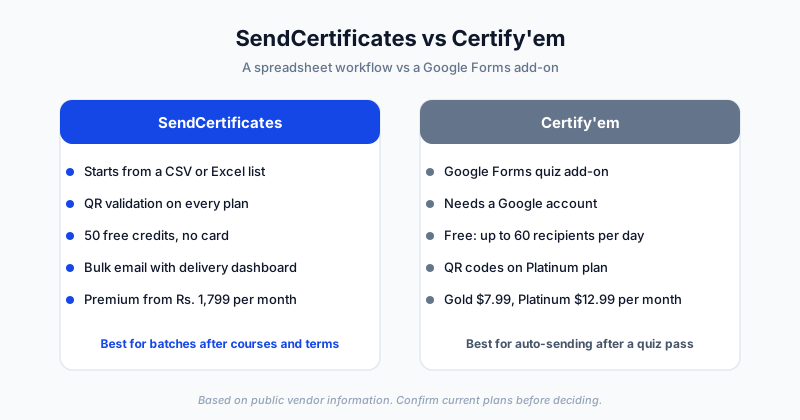
This comparison is based on Certify'em's public website, including its home, pricing, FAQ, and QR code help pages, and on SendCertificates' own plans. Where a detail was not stated on the pages we reviewed, we say so instead of guessing. Plans change, so confirm current details with each vendor.
Platform Overview
SendCertificates is a digital certificate platform for people who issue many certificates at once. You choose or design a template, upload a spreadsheet of recipients, map fields such as name, course, and date, and send. Every certificate carries QR code validation, and a dashboard tracks delivery.
Certify'em describes itself as an online certificate generation and issuance platform that works with Google Forms and Google Slides. Its FAQ calls it a Google Forms add-on that "extends the functionality of Quizzes by allowing you to send a certificate when someone passes, and keep certification records." It is developed by Gleeda Software LLC, not Google. Certificates are emailed as PDFs or images, and a Google spreadsheet keeps a record of issued certificates.
Feature Comparison
| Feature | SendCertificates | Certify'em |
|---|---|---|
| How issuance starts | Upload a CSV or Excel recipient list | A Google Form or quiz submission |
| Built on Google Forms | No, works from an uploaded file | Yes, Gmail or Google Workspace account needed |
| Templates | Drag-and-drop editor, templates included | Dozens of templates, Google Slides customisation, custom uploads, merge tags |
| Free plan | 50 certificate credits, no card | Free, up to 60 email recipients per day |
| QR code verification | On every plan, including free | Platinum plan only |
| Email delivery | Yes, with delivery tracking | Yes, with customisable branded emails |
| Records of issued certificates | Analytics dashboard | Google spreadsheet of issued certificates |
| Paid pricing | Premium Rs. 1,799 per month, 1,000 credits | Gold $7.99 USD, Platinum $12.99 USD per month |
| Spreadsheet bulk import | Core workflow | Not mentioned on the pages we reviewed |
Pricing in More Detail
Certify'em's pricing page lists four options. Free is "100% Free to Use" with a limit of 60 recipients per day. Gold is $7.99 USD per month or $79.99 per year, with up to 400 recipients per day. Platinum is $12.99 USD per month or $129.99 per year, with up to 1,500 recipients per day, saving sent certificates in Google Drive, and QR code verification. There is also an Event Pass at $25.99 USD one time, which expires after 60 days and gives Platinum-level features.
The pricing page adds that higher daily limits depend on your Google account, and that the 1,500 per day Platinum limit needs a mature Google Workspace account. Its FAQ also mentions processing of roughly 50 form responses per minute.
SendCertificates counts credits rather than daily recipients. The free plan gives 50 credits, and Premium at Rs. 1,799 per month gives 1,000 credits per month, 10 templates, an advanced analytics dashboard, custom email branding, priority support, and 50 premium fonts. The two models are hard to compare directly, because one limits per day and the other per credit.
Where SendCertificates Is the Better Fit
Your recipient list is a spreadsheet. Graduation lists, workshop attendance sheets, and LMS exports end up as a CSV. SendCertificates is designed for that: upload, map fields, preview, send. See our guide to sending certificates in bulk for the full workflow.
You want QR verification without a paid tier. Every SendCertificates certificate carries a scannable code that leads to a verification page. For how that helps employers and institutions check a credential, read our guide to QR-verified certificates.
You do not want to build around Google Forms. Certify'em requires a Gmail or Google Workspace account and issues from Google Forms. If your office does not work inside Google tools, a standalone platform that takes an uploaded file avoids that dependency.
You want to test a real batch first. Fifty credits is enough to run a small cohort end to end before paying anything.
Where Certify'em May Be the Better Fit
Your assessments already live in Google Forms. If a course or training uses Google Forms quizzes, Certify'em's pitch is exactly that: send the certificate automatically when someone passes, or delay it and review first. A spreadsheet-first tool would need you to export results before sending.
You want a lower entry price for paid features. Certify'em's Gold plan is listed at $7.99 USD per month, and the Event Pass at $25.99 USD one time suits a single event. Whether that is cheaper for you depends on your volume and exchange rate.
Data staying in your own Drive matters. Certify'em's FAQ says certificates are stored in your own Google Drive and that it does not store your Google Forms data, and it references GDPR, COPPA, and FERPA. For a school or university, read those statements in full on their site and confirm them against your own requirements. We have not independently reviewed them.
A Note on Academic Credentials
For academic programs, the main question is where your results come from. If instructors grade through Google Forms quizzes, an add-on that sits inside Forms is a natural match. If the registrar or program office exports a final list, a spreadsheet-based tool is more direct. Certify'em's pages do not describe university-specific features or institutional deployments, so if you need single sign-on, student record integration, or contractual terms, ask them directly. Our page on education and academic certificates and the academic certificate guide cover what an academic certificate usually needs to include.
Which Should You Choose?
Choose SendCertificates if:
- Your recipients live in a CSV or Excel file
- You issue certificates in batches after courses, events, or terms
- QR code validation on every certificate matters to you
- You do not want to build your process around Google Forms
Choose Certify'em if:
- Your assessment already happens in Google Forms quizzes
- You want certificates sent automatically on a pass
- A low-cost monthly plan or a one-time Event Pass fits your volume
How to Decide in 20 Minutes
- Take a real list of 20 to 50 recipients or quiz responses.
- Build the same certificate in both tools.
- Send to yourself and a colleague.
- Compare setup time, how the email looked, and whether you could verify the certificate.
Whichever result felt less like work is your answer. For a wider shortlist, see our roundup of the best certificate management software in 2026.
Getting Started
If your next batch is a course cohort, a workshop, or a graduating class, you can try the spreadsheet-to-inbox workflow free. SendCertificates includes 50 free credits, and you can create a free account without a credit card.
Related Guides
Tags