A training certificate is the proof that someone completed your course - and the template you use decides whether it looks credible or generic. Get the fields right and you have a document trainees are proud to keep. This guide covers exactly what a training certificate template should contain, gives you the standard format and sample wording, weighs free against branded options, and shows how to issue certificates to an entire cohort at once.
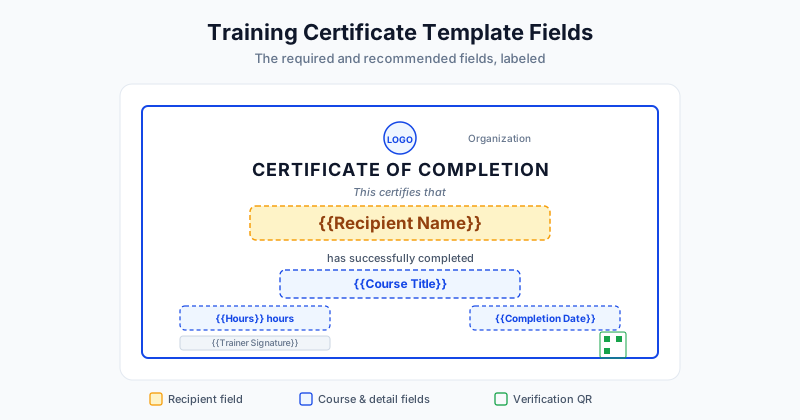
What a Training Certificate Template Should Include
A training certificate has a small set of required fields and a few optional ones that add credibility. The required fields establish who completed what, and the optional fields make the certificate useful for records and verification.
| Field | Required? | Why it matters |
|---|---|---|
| Recipient's full name | Required | The person being certified - the focal point |
| Training / course title | Required | What was completed |
| Completion date | Required | When the training finished |
| Issuing organization | Required | Who is standing behind the certificate |
| Authorized signature | Required | A real, named signatory |
| Hours / duration | Recommended | Supports CEUs and compliance records |
| Certificate ID | Recommended | For records and verification |
| Verification QR / link | Recommended | Lets anyone confirm authenticity |
| Trainer name | Optional | Adds personal accountability |
The required fields are the minimum for a certificate to mean anything. The recommended fields are what separate a casual completion note from a document a licensing board or employer will accept.
The Standard Training Certificate Format
Most training certificates follow the same proven layout, top to bottom:
- Header - "Certificate of Completion" or "Certificate of Training"
- Logo - the issuing organization's mark
- Recipient line - "This certifies that [Full Name]"
- Achievement line - "has successfully completed [Course Title]"
- Detail line - "[Hours] hours of training" and the completion date
- Signature block - the authorized signatory's name and title
- Footer - certificate ID and a verification QR code
The single most important rule is to make the recipient's name the largest, most prominent element. That is what people look at first, and it is what makes the certificate feel personal. Everything else supports it.
Sample Training Certificate Wording
Here are three wordings you can adapt to the formality of your program:
Standard completion:
This certifies that [Full Name] has successfully completed [Course Title] ([X] hours) on [Date]. Issued by [Organization Name].
Skills or compliance training:
[Full Name] has completed the required [Course Title] training and demonstrated competency in the covered material. Delivered by [Organization Name] on [Date]. Certificate ID: [ID].
Professional development:
This confirms that [Full Name] attended and completed [Course Title] ([X] contact hours), delivered by [Organization Name] on [Date], toward continuing professional development.
Keep the language plain and accurate. Overstated wording undermines credibility, especially when the certificate is checked.
Free vs Branded Templates
You can build a training certificate for free, and for small or informal groups that is perfectly fine. But there are real differences between free templates and a branded, verifiable certificate.
| Free template | Branded + verifiable | |
|---|---|---|
| Cost | Free | Usually paid at scale |
| Branding | Generic | Your logo and colors |
| Verification | None | QR code / link |
| Bulk issuing | Manual | Automated |
| Best for | Small, informal groups | Professional, accredited, or large cohorts |
If you just need a few certificates for an internal workshop, a free template works. If the certificate carries professional weight - or you are issuing to dozens or hundreds of people - a branded, verifiable approach pays off quickly. For places to find ready-made options, see our roundup of free certificate templates.
How to Issue Training Certificates to a Whole Cohort
Once your template is ready, the real time-saver is issuing to everyone at once instead of editing files one by one. The workflow is straightforward:
- Export your cohort list with each trainee's name, email, and any per-person details (hours, score, date)
- Save it as a spreadsheet - Excel or CSV
- Upload the file to SendCertificates along with your training template
- Map each spreadsheet column to the matching field on the template
- Generate - every trainee receives a personalized, verifiable certificate by email
Because each field fills automatically from your data, you avoid the typos that come from manual editing, and a cohort of two hundred takes the same effort as a cohort of two. For an HR-focused walkthrough of the end-to-end process, read how to issue training certificates.
Common Template Mistakes
A few avoidable mistakes weaken otherwise good certificates:
- Burying the name - if the recipient's name is not the largest element, the certificate feels generic
- Missing the date - a certificate without a completion date is hard to use for records
- No signature - an unsigned certificate looks unofficial
- No verification - for anything with professional value, leaving out a QR code or link invites doubt
- Inconsistent branding - mismatched fonts and colors undercut a professional look
Getting Started
A strong training certificate is mostly about getting the template right: the required fields, a clean standard format, and accurate wording. Build it once and every cohort after that is simple to certify.
SendCertificates lets you set up a branded training template with all the right fields, then auto-fill and email personalized, verifiable certificates to an entire cohort from one spreadsheet - with 50 free credits to start.
Related Guides
Tags