When a learner finishes your online course, the certificate is the proof they carry forward - to a resume, a LinkedIn profile, or a manager. A clean, verifiable course certificate makes your program look professional and gives learners something real to share.
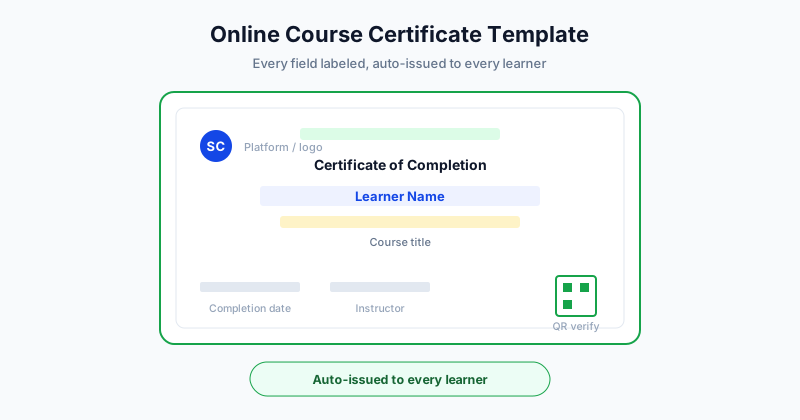
This guide covers what to put on an online course certificate, sample wording you can copy, and how to auto-issue a personalized certificate to every learner without manual work.
What an Online Course Certificate Should Include
A strong course certificate has a predictable set of elements. Each one answers a question the reader might have.
| Element | Why it matters |
|---|---|
| Learner name | Identifies who earned the credential |
| Course title | States exactly what was completed |
| Completion date | Shows when the learning happened |
| Instructor or platform | Establishes who is vouching for it |
| Logo or branding | Makes the certificate look official |
| Verification (QR or link) | Lets anyone confirm it is genuine |
| Certificate ID | Gives each credential a unique reference |
| Signature line | Adds a human stamp of authority |
You do not need every element on every certificate, but the first four are essential, and verification is what turns a nice graphic into a credential people trust.
Online Course Certificate Wording Examples
The body wording should be formal, specific, and uncluttered. Here are copy-ready lines for different course types.
Course Completion
- "This certificate is awarded to [Name] for successfully completing [Course Title] on [Date]."
- "This is to certify that [Name] has completed all requirements of [Course Title]."
Skill or Mastery Course
- "Presented to [Name] in recognition of demonstrated proficiency in [Skill] through completion of [Course Title]."
- "[Name] has successfully completed [Course Title] and demonstrated mastery of the course material."
Certification or Exam-Based Course
- "This certifies that [Name] has passed the [Course Title] assessment and is hereby certified in [Topic]."
Short Workshop or Masterclass
- "Awarded to [Name] for attending and completing the [Workshop Title] masterclass on [Date]."
Pick the line that matches your course, then add the date, instructor, and verification details around it. For more wording patterns across certificate types, see our certificate of completion guide.
Where to Get a Template
You have three practical options:
- Start from a ready-made template inside a certificate platform and customize the colors, logo, and text. This is the fastest path.
- Use a free downloadable template if you only need a one-off and do not mind manual editing. See our roundup of free certificate templates.
- Design your own from scratch if you have strong branding requirements and design skills.
For any course with more than a handful of learners, the platform route wins because the same template becomes the basis for automatic issuance.
How to Auto-Issue Certificates to Every Learner
The real time saver is not the template - it is issuing the certificate to every learner without touching each one. The workflow is straightforward:
- Design the template once with placeholder fields like name, course, and date.
- Bring in your learners by uploading a CSV or Excel export, or by connecting your course platform.
- Map the fields so the system knows which column fills each placeholder.
- Generate and send. The system creates one personalized certificate per learner and emails it automatically.
Because the process is data-driven, issuing 1,000 certificates takes about the same effort as issuing 10. You build one template and point it at your learner list. To go deeper on the eLearning side specifically, read our guide on certificates for online courses and eLearning, and explore the platform at SendCertificates.
Make Course Certificates Verifiable
Verification is what separates a real online course credential from a screenshot. When each certificate carries a unique QR code or verification link:
- Employers can confirm the credential in one click
- Learners can confidently add it to LinkedIn and resumes
- Your program gains credibility and protects against forgery
- You keep a record of every certificate issued
This single feature is often the difference between a certificate that gets shared and one that gets ignored. A verifiable certificate signals that your course is legitimate and that completing it means something.
Design Tips for a Professional Look
A few small choices make a certificate look polished:
- Keep it uncluttered. White space makes the credential feel official.
- Use your brand colors and logo, but sparingly.
- Make the learner name prominent. It is the part people screenshot.
- Choose readable fonts. Skip decorative scripts for the core details.
- Align everything. Crisp alignment reads as trustworthy.
The goal is a certificate that looks at home next to a learner's other professional credentials.
Common Mistakes to Avoid
A few errors quietly undermine otherwise good course certificates:
- No verification. A plain image is easy to fake and hard to trust, so learners hesitate to share it.
- Vague course titles. "Marketing Course" tells an employer little. Name the specific program.
- Inconsistent branding. Certificates that look different from one cohort to the next read as unofficial.
- Manual issuance at scale. Editing and emailing certificates one by one invites typos and delays.
- Missing dates or IDs. These details give the credential context and a reference point for verification.
Avoiding these keeps your certificates credible and your program looking professional, even as enrollment grows.
Getting Started
A great online course certificate is specific, professional, and verifiable - and the smartest way to handle it is to design one template and auto-issue it to every learner. That keeps your branding consistent and your workload near zero, no matter how many people complete the course.
SendCertificates lets you customize an online course certificate template, connect or upload your learner list, and auto-issue verifiable certificates to everyone at once. You can start with 50 free certificate credits to try the full workflow end to end.
Related Guides
Tags