Digital certificates have become one of the most practical tools a student can collect, share, and build a record around. This guide explains what they are, why they matter for both academics and careers, and how schools can issue verifiable student certificates at scale.
What Is a Digital Certificate for Students?
A digital certificate is an electronic credential that proves a student completed something specific, such as a course, a workshop, an internship, an exam, or a co-curricular achievement. Instead of a printed sheet that sits in a folder, it lives as a PDF or a web page that can be opened on any device, shared with a link, and verified online in seconds.
For students, the format matters as much as the content. A digital certificate is portable, cannot be physically lost, and carries a built-in way to prove it is genuine. That last point is what separates a modern student certificate from a simple image file: a real verifiable certificate includes a QR code or a verification link that anyone can use to confirm who issued it and to whom.
Why Digital Certificates Matter for Students
Students are constantly asked to prove what they have done. College admissions teams want evidence of academic and extracurricular achievement. Employers want proof of skills. Scholarship committees want documentation. A digital certificate answers all three in a single, shareable form.
The advantages add up quickly:
- Portability: One link works across email, applications, and social profiles.
- Credibility: A verification link signals the credential is real, not self-made.
- Permanence: There is no certificate to misplace before an important deadline.
- Speed: Students can attach proof of a skill the moment an opportunity appears.
In a competitive environment, the student who can instantly show a verified record has a real edge over one who promises to "find the paper certificate later."
Where Students Actually Use Digital Certificates
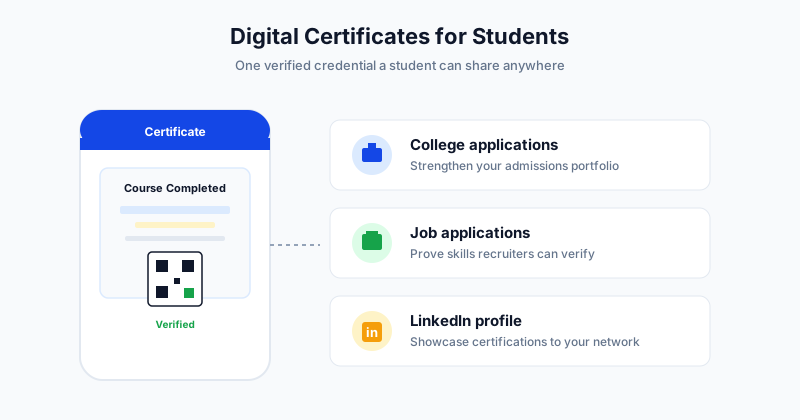
The value of a student certificate is in how widely it travels. Three destinations matter most.
College and University Applications
Admissions is increasingly holistic. Beyond grades, schools look for evidence of initiative: online courses, summer programs, language proficiency, coding bootcamps, and volunteering. A verifiable digital certificate is clean, professional supporting evidence that strengthens an application portfolio.
Job and Internship Applications
For first jobs and internships, students rarely have deep work history, so proof of skills carries extra weight. A certificate for a completed course or training program shows initiative and gives a recruiter something concrete to verify. Attaching a verification link removes any doubt about authenticity.
LinkedIn and Professional Profiles
LinkedIn lets students add certifications directly to their profile, where recruiters and connections can see them. A digital certificate with a shareable link fits this perfectly and turns a finished course into a visible, ongoing signal of growth. If you want a step-by-step walkthrough, see the related guide on adding a certificate to LinkedIn below.
How Schools and Educators Issue Student Certificates at Scale
The student side is only half the story. For schools, training centers, and educators, the real challenge is issuing certificates to dozens or hundreds of students without spending days on manual work.
The old approach was painful: design a template, type each student name by hand, export each file, and email them one at a time. That does not scale past a small group, and it invites typos and missed recipients.
A modern bulk workflow looks like this:
- Design or choose a certificate template once.
- Upload a spreadsheet of student names and details.
- The platform generates one personalized certificate per row.
- Each certificate is emailed automatically, with a verification link or QR code attached.
- The issuer tracks delivery so no student is missed.
With a tool like SendCertificates, an entire cohort can receive verified certificates in minutes rather than days. The result is consistent design, zero manual copying, and a credential each student can trust and share.
Paper vs Digital Certificates for Students
The contrast is stark once you compare the two side by side.
| Factor | Paper Certificate | Digital Certificate |
|---|---|---|
| Sharing | Scan or photograph each time | One link or PDF, instantly |
| Verification | Hard to confirm authenticity | QR code or verification link |
| Risk of loss | High, easy to misplace | None, stored online |
| Issuing at scale | Slow, manual printing | Bulk generation in minutes |
| Fit for LinkedIn | Requires scanning | Add directly to profile |
| Cost over time | Printing and postage | Minimal per certificate |
For most student use cases today, the digital format is not just more convenient, it is the format colleges and employers increasingly expect.
What Makes a Student Certificate Trustworthy
Not every digital file deserves to be called a certificate. To be genuinely useful to a student, it should include:
- A clear issuer name (the school, instructor, or organization).
- The student's full name, spelled correctly.
- A precise description of what was achieved.
- An issue date and, where relevant, a credential or reference ID.
- A QR code or verification link that proves authenticity.
When these elements are present, a certificate stops being decorative and becomes evidence. That is the difference between a graphic a student made themselves and a credential an admissions officer or recruiter will take seriously.
Get Started With Verified Student Certificates
If you run a course, club, school, or training program, issuing verifiable digital certificates is one of the highest-value things you can give your students. They walk away with proof they can use for years, and you save hours of manual work every cohort. SendCertificates lets you design once, upload a student list, and send personalized, QR-verified certificates in bulk, with delivery tracking built in. New accounts include 50 free credits, so you can issue your first batch of student certificates at no cost and see the workflow end to end before scaling up.
Related Guides
Tags