If your organization issues certificates to anyone - students, trainees, event attendees, members - you eventually outgrow the copy-paste-and-attach approach. A certificate generation and distribution system replaces that manual grind with a single workflow that creates, verifies, delivers, and tracks every certificate for you.
This guide explains what these systems are, how they work end to end, and the features that actually matter when you choose one.
What Is a Certificate Generation and Distribution System
A certificate generation and distribution system is software that combines two jobs that used to be separate:
- Generation - producing a personalized certificate for each recipient from a single template
- Distribution - delivering those certificates to the right people and proving they are genuine
Older workflows treated these as different chores: you would design certificates in one tool, export PDFs, then attach and email them one by one. A modern system merges everything into one pipeline, so the moment a certificate is generated it is also verified, delivered, and logged.
Think of it as a purpose-built assembly line for credentials, where the input is a spreadsheet and the output is hundreds of verified certificates sitting in recipients' inboxes.
How the System Works End to End
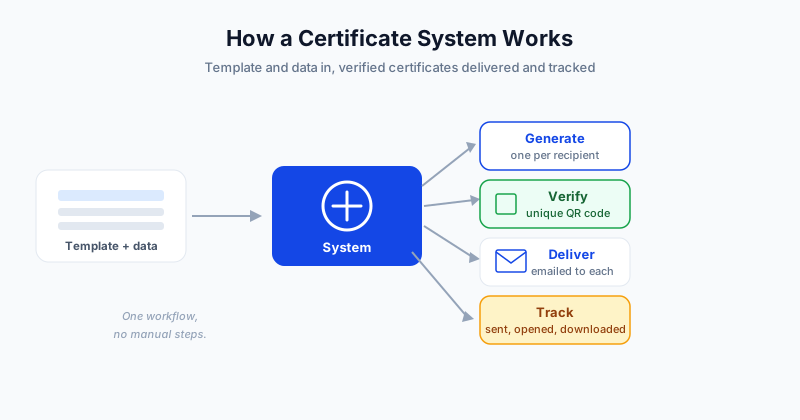
Every certificate system follows the same core pipeline. The inputs are a template and recipient data, and the outputs branch into generate, verify, deliver, and track.
- Template plus recipient data (input). You design a certificate once with placeholder fields like name, course, and date, then upload a spreadsheet where each row is one recipient.
- Generate. The engine merges each row into the template, producing one personalized certificate per recipient.
- Verify. A unique QR code or verification link is attached to every certificate so anyone can confirm it is authentic.
- Deliver. Each certificate is emailed to the address in its row, no manual attaching required.
- Track. The system records when every certificate was sent, opened, and downloaded.
The defining idea is that the work is data-driven. You are not building 500 certificates - you are building one template and pointing it at 500 rows. That is why generating 1,000 certificates takes about the same effort as generating 10.
The Core Building Blocks
Underneath the pipeline, a complete system is made of a few key components:
- Template designer with reusable placeholder fields
- Data import for CSV or Excel recipient lists
- Merge engine that swaps placeholders for real values
- Verification layer that issues a unique code per certificate
- Delivery engine for automated, tracked email
- Dashboard to manage, re-issue, and revoke certificates
Each block removes a manual step that used to eat hours. Together, they turn a multi-day project into a few minutes of setup.
Manual Process vs a Dedicated System
The difference becomes obvious as soon as volume climbs.
| Capability | Manual process | Dedicated system |
|---|---|---|
| Personalizing each certificate | Type every field by hand | Filled from your spreadsheet |
| Time for 500 certificates | Hours to days | Minutes |
| Verification | Usually none | Unique QR or link per certificate |
| Delivery | Attach and send one by one | Auto-emailed in bulk |
| Delivery tracking | None | Sent, opened, downloaded logged |
| Re-issuing a copy | Find and redo the file | Resend from dashboard |
| Error risk | High - typos and wrong names | Low - mapped once, applied to all |
At ten certificates the manual approach is merely tedious. At a few hundred it is a full day of error-prone work that a system handles in minutes. For a deeper walkthrough of moving from manual to automated, see how to automate certificate generation and distribution.
Features to Look For When Choosing One
Not all certificate platforms are equal. When you evaluate options, weigh these features:
- Personalization depth - can any column in your data become a field, not just the name?
- Verification - does each certificate get a unique QR code or verification page? This is what separates a real credential from a plain image.
- Bulk import - can you upload a spreadsheet and map columns in a few clicks?
- Automated delivery - does the system email certificates for you and confirm delivery?
- Tracking and audit trail - can you see who received and opened each certificate?
- Re-issue and revoke - can you resend a lost copy or invalidate a mistaken one?
- Integrations - does it connect to your LMS, event platform, or CRM?
The verification and tracking pieces matter most for credibility. A certificate that can be confirmed in one click is trustworthy enough to put on a resume or LinkedIn profile. To understand the auto-generation engine in more depth, read how an automated certificate generator works.
Who Needs One
A certificate generation and distribution system pays off the moment you are issuing to more than a handful of people, or issuing repeatedly. Typical users include:
- Training providers running courses on a schedule
- Schools and universities issuing completion and achievement certificates
- Event organizers sending attendance and participation certificates
- Associations issuing membership and continuing-education credentials
- HR and L&D teams recognizing internal training milestones
If any of those describe you, the manual approach is quietly costing you time and credibility.
Getting Started
A certificate generation and distribution system collapses creation, verification, delivery, and tracking into one workflow. You design a certificate once, upload your recipients, and let the system handle personalization, verification, and delivery for everyone at once.
SendCertificates is a complete certificate generation and distribution system, and it gives you 50 free certificate credits to try the entire flow - upload a spreadsheet, generate personalized certificates, and email them with QR verification and delivery tracking included. For a step-by-step look at the sending side, see how to send bulk certificates, or explore the full platform at SendCertificates.
Related Guides
Tags