If you have ever made certificates by opening a template, typing in one name, exporting a PDF, and repeating that fifty times, you already understand why people search for an automated certificate generator. Automation removes the repetitive part entirely: you set up the certificate once, hand the tool a list of recipients, and it produces a personalized, verifiable certificate for every single one.
This guide explains exactly how auto-generation works, what you need to get started, and when it is worth switching from manual to automated.
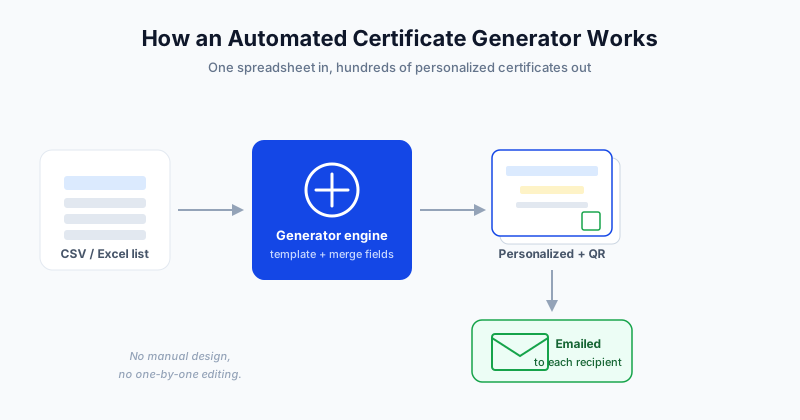
What Is an Automated Certificate Generator
An automated certificate generator is software that combines two inputs:
- A certificate template with placeholder fields like name, course, and date
- A recipient list - a spreadsheet where each row is one person
It merges the data into the template and outputs one finished certificate per row. The better tools also add a verification QR code and email each certificate to its recipient, so generation and distribution happen together.
Think of it like a mail merge, but built specifically for certificates and with verification baked in.
How Auto-Generation Actually Works (the pipeline)
Under the hood, every automated generator follows the same pipeline:
- Template with placeholders - you design the certificate once and mark the parts that change, such as
{{Full Name}}and{{Course}} - Data upload - you upload a CSV or Excel file of recipients
- Field mapping - you tell the tool which column fills which placeholder
- Merge - the engine generates one certificate per row, swapping placeholders for real values
- Verification - a unique QR code or link is attached to each certificate
- Delivery - each certificate is emailed to the address in its row
The key idea is that the work is data-driven. You are not making 500 certificates - you are making one template and pointing it at 500 rows. For a hands-on walkthrough of preparing the data, see how to generate certificates from a CSV.
Manual vs Automated: A Side-by-Side
| Step | Manual | Automated |
|---|---|---|
| Personalizing each certificate | Type every name by hand | Filled from your spreadsheet |
| Time for 500 certificates | Hours to days | Minutes |
| Error risk | High - typos, wrong names | Low - data is mapped once |
| Verification | Usually none | Unique QR per certificate |
| Delivery | Attach and email one by one | Auto-emailed in bulk |
| Re-issuing a copy | Find and redo the file | Resend from dashboard |
The gap widens fast with volume. At ten certificates manual is merely annoying. At a few hundred it becomes a full day of work that automation does in minutes.
What You Need to Get Started
You need surprisingly little:
- A recipient list with at least a name and email column
- A certificate template - either one you design or a ready-made one
- An automated certificate platform to do the merging and sending
That is it. No design software and no technical skills are required for most modern tools.
Setting Up Your First Automated Batch
Here is the fastest path from zero to sent:
- Prepare your spreadsheet with columns like Name, Email, Course, and Date
- Open SendCertificates and pick or customize a template
- Map each template field to the matching spreadsheet column
- Preview one certificate to confirm the data lands correctly
- Send - every recipient gets their personalized certificate by email
The whole process for a few hundred recipients takes about five minutes once your template is ready. For programs that issue certificates continuously, you can also connect automation to your learning platform - see certificate automation for your LMS.
Personalization, QR Verification, and Delivery
Three things separate a real automated generator from a basic image maker:
- Deep personalization - any column in your data can become a field on the certificate, not just the name
- QR verification - each certificate links to a verification page, which prevents forgery and builds trust with employers
- Tracked delivery - you can see who received, opened, and downloaded their certificate
These are exactly the features that make auto-generated certificates trustworthy enough to put on a resume or LinkedIn profile.
When Automation Pays Off
Automation is worth it the moment you are issuing certificates to more than a handful of people, or issuing them repeatedly. Specific signals:
- You run the same training or event on a schedule
- You issue certificates to cohorts of 20, 200, or 2,000
- You need proof that certificates are genuine
- You want a record of what was issued and to whom
If any of those apply, manual issuance is costing you time and credibility. For the broader strategy around automating the whole flow, read how to automate certificate generation and distribution.
Getting Started
An automated certificate generator turns the most tedious part of recognition into a five-minute task. Design your certificate once, upload your list, and let the tool handle personalization, verification, and delivery for everyone at once.
SendCertificates gives you 50 free certificate credits to try the entire workflow - upload a spreadsheet, auto-generate personalized certificates, and email them with QR verification included.
Related Guides
Tags