Choosing certificate software in 2026 is confusing because two very different kinds of tools both call themselves certificate makers. Some are pure design apps, and some are full platforms that design, personalize, deliver, and verify. Picking the wrong category wastes time and money.
This guide compares the best certificate design software in 2026 honestly, explains which type fits which job, and gives you a simple framework to decide. SendCertificates appears here as a strong option, but the goal is to help you choose well even if that is not what you land on. You can always compare for yourself at the SendCertificates homepage.
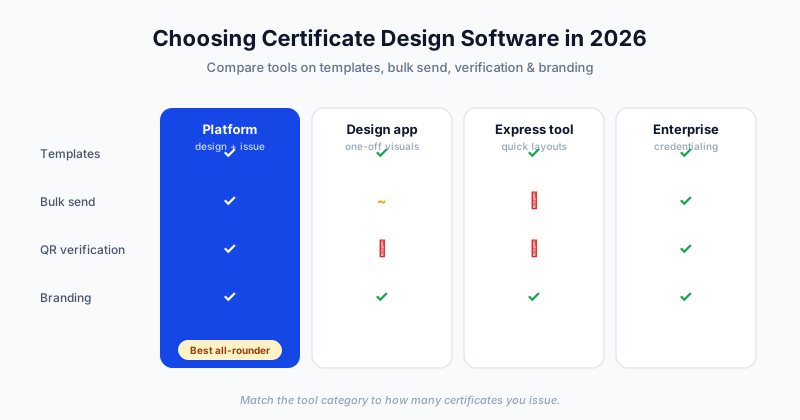
Two Categories You Need to Tell Apart
Before comparing names, understand the split. It explains almost every frustration people have with certificate tools.
- Design-first tools focus on the visual. You craft one beautiful certificate, then export it. Examples include Canva, Adobe Express, and Visme. They shine when you need a single design or full creative freedom.
- Certificate platforms treat the design as one step in a larger workflow. They also personalize for hundreds of recipients from a data file, email each one, and attach verifiable QR codes. SendCertificates and Accredible sit here.
Neither category is better in the abstract. A graphic designer making one award wants a design-first tool. A training company issuing 500 completion certificates a month wants a platform. Many teams are surprised to learn they actually need the second category.
What to Look For
Regardless of category, strong certificate software should cover most of these capabilities. Weight them by how you actually work.
- Template quality so you start from something professional, not a blank page
- Personalization that swaps in names, dates, and other fields cleanly
- Brand controls for logos, colors, and fonts that match your identity
- Bulk generation from a spreadsheet when you issue at volume
- Delivery by email so recipients receive certificates without extra steps
- Verification through QR codes or hosted pages so credentials can be trusted
- Ease of use so non-designers can produce good results quickly
The first three matter to everyone. The last four separate a hobby tool from something a serious team can rely on.
Feature Comparison
Here is how representative tools stack up across the capabilities that matter most. Treat this as a directional guide, since every product updates its plans over time.
| Capability | SendCertificates | Canva | Adobe Express | Accredible |
|---|---|---|---|---|
| Professional templates | Yes | Yes (large library) | Yes | Yes |
| Easy personalization | Yes | Limited | Limited | Yes |
| Bulk generation from CSV | Yes | Partial (bulk create) | No | Yes |
| Automatic email delivery | Yes | No | No | Yes |
| QR verification | Yes | No | No | Yes |
| Branding controls | Yes | Yes | Yes | Yes |
| Best for | Design plus bulk issuance | One-off visuals | One-off visuals | Enterprise credentialing |
The pattern is clear. Design-first tools win on creative range and free-form layouts. Platforms win when issuance, delivery, and verification matter. If you only ever make one certificate, the extra platform features are wasted. If you issue regularly, the design-only tools leave you doing the hardest work by hand.
Where Design-First Tools Excel
Tools like Canva and Adobe Express deserve real credit. Their template libraries are enormous, their editors are intuitive, and their creative flexibility is hard to match. For a one-time award, a single event certificate, or a custom layout that has to look exactly a certain way, they are excellent.
Their limit appears the moment you need scale. Personalizing 200 certificates, emailing each recipient, and giving every certificate a verifiable identity is not what they are built for. You end up exporting files and stitching together a manual process around them, which is slow and error prone.
Where Certificate Platforms Excel
Platforms like SendCertificates start from the assumption that you are issuing more than one certificate. You design or pick a template, upload a spreadsheet of recipients, and the platform generates a personalized, verifiable certificate for each row and emails it out. Every certificate carries a QR code that links to a verification page, so an employer or licensing body can confirm authenticity.
That changes the math for any team that issues certificates regularly. The design step still matters, and good platforms include solid templates and branding, but the heavy lifting of personalization, delivery, and verification is automated. The honest tradeoff is that platforms usually offer less free-form creative control than a pure design app. If your priority is a unique, hand-crafted layout, weigh that.
How to Choose
Use this quick decision path:
- How many certificates do you issue? One or a handful, occasionally, points to a design-first tool. Dozens or hundreds, regularly, points to a platform.
- Do recipients need to verify their certificate? If yes, you need a platform with QR or hosted verification.
- Who is doing the work? A designer wanting full control leans design-first. An operations or training lead wanting speed leans platform.
- Does delivery matter? If you want certificates emailed automatically, a platform saves real hours.
Most teams that answer these honestly find they need design plus issuance, which is the platform category.
Try It Before You Commit
The fastest way to know which tool fits is to run your real use case through it. With SendCertificates you can upload a small list, pick a template, and watch personalized, verifiable certificates get generated and delivered. New accounts include 50 free credits, so you can test the full design-to-delivery flow before deciding whether a platform is right for you.
Related Guides
Tags